Resurrecting Email Notifications on a Legacy NAS

QNAP TS-559 Pro+

My QNAP TS-559 Pro+ has been running faithfully since around 2010. It’s well past its end-of-life, but still perfectly capable of serving files. What it can’t do anymore is send email notifications. Not because the feature is broken, but because the internet moved on without it.

I used to have email notifications set up through my Google account, but some time around 2023-2024, this silently stopped working. I believe it was due to Google sunsetting basic authentication for SMTP in favor of OAuth.

I did attempt to use a few of the other options, but Yahoo was a dud, and I gave up on trying the Chinese options. Even using Chrome’s built-in translation feature, it was pretty impossible to navigate any of those sites.
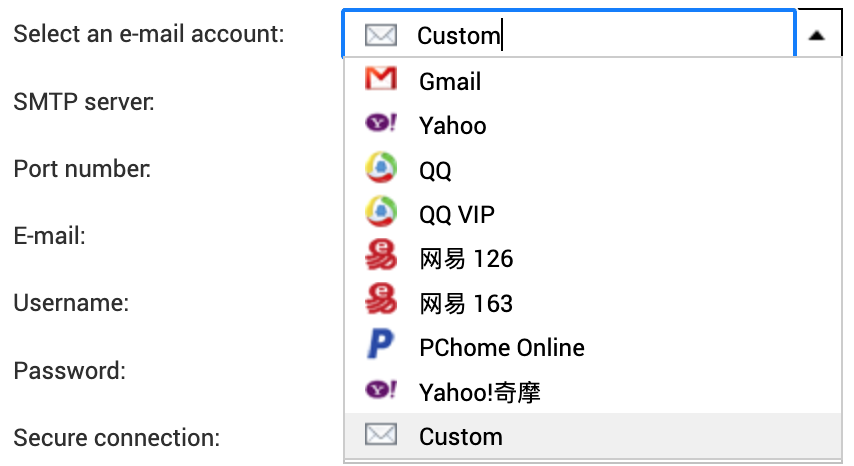
These days I tend to use Resend for transactional email, and they do what they can to accommodate most setups, even allowing you to connect on non-standard ports like 2465 and 2587. Despite that, every attempt to try to send through their SMTP relay would fail with the error message you see below.
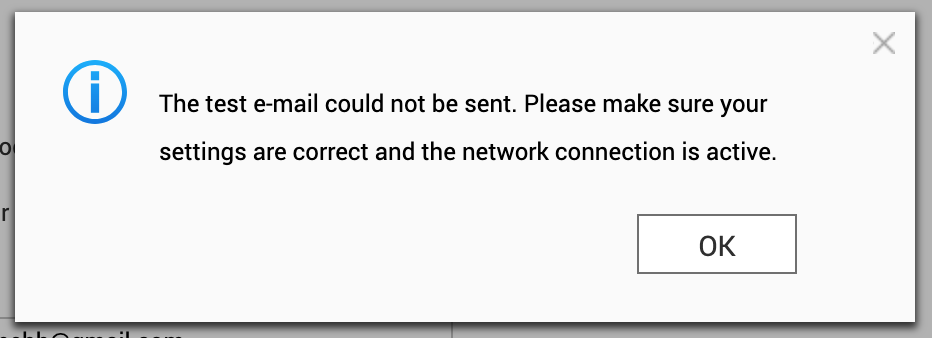
The built-in log which can be accessed through the UI, was just a repeat of the same message. Not much to go by really. Time to to crack this one open, and see if more could be revealed directly on the machine.

First theory: ancient OpenSSL

I’m no expert on SMTP, but there’s some TLS in there somewhere, and OpenSSL seems to always be part of any Linux cryptography stack, so it goes to reason to look there first:

[~] # openssl version
OpenSSL 1.0.1u  22 Sep 2016

My first thought was that this version might simply be too old and if used by the mailsender of the system, maybe it couldn’t speak modern TLS.

The final firmware update for the device was 4.2.6 build 20240618, so under two years old at the time of writing. QNAP has officially stopped supporting it this device though, so there’s not much hope for getting it updated from official channels.

To test this, I tried connecting directly to the resend smtp server with openssl s_client, but that immediately uncovered another issue: the NAS didn’t trust modern certificates.

Let’s Encrypt uses the ISRG Root X1 certificate, which older devices don’t have in their trust store:

[/etc/ssl/certs] # openssl s_client -connect smtp.resend.com:465 -tls1_2
CONNECTED(00000003)
depth=1 C = US, O = Let's Encrypt, CN = E8
verify error:num=20:unable to get local issuer certificate
verify return:0
---
Certificate chain
 0 s:/CN=*.resend.com
   i:/C=US/O=Let's Encrypt/CN=E8
 1 s:/C=US/O=Let's Encrypt/CN=E8
   i:/C=US/O=Internet Security Research Group/CN=ISRG Root X1
---
...
Verify return code: 20 (unable to get local issuer certificate)
---
220 Resend SMTP Relay ESMTP

There it is:

Verify return code: 20 (unable to get local issuer certificate)

It didn’t have the ISRG Root X1 in its trust store. The TLS handshake completes (OpenSSL continues by default), but a properly configured mail client would likely reject this.

To test the theory, I downloaded the missing root certificate. Of course, letsencrypt.org also uses a certificate signed by ISRG Root X1, so fetching the certificate itself can’t be done securely.

[/etc/ssl/certs] # curl -o ISRG_Root_X1.pem https://letsencrypt.org/certs/isrgrootx1.pem
curl: (60) SSL certificate problem: unable to get local issuer certificate
[/etc/ssl/certs] # curl -k -o ISRG_Root_X1.pem https://letsencrypt.org/certs/isrgrootx1.pem

I had to look up how to add a root certificate, but luckily it’s not complicated:

[/etc/ssl/certs] # openssl x509 -hash -noout -in ISRG_Root_X1.pem
4042bcee
[/etc/ssl/certs] # ln -s ISRG_Root_X1.pem 4042bcee.0

Then onto testing again:

[/etc/ssl/certs] # openssl s_client -connect smtp.resend.com:465 -tls1_2
CONNECTED(00000003)
depth=2 C = US, O = Internet Security Research Group, CN = ISRG Root X1
verify return:1
depth=1 C = US, O = Let's Encrypt, CN = E8
verify return:1
depth=0 CN = *.resend.com
verify return:1
---
Certificate chain
 0 s:/CN=*.resend.com
   i:/C=US/O=Let's Encrypt/CN=E8
 1 s:/C=US/O=Let's Encrypt/CN=E8
   i:/C=US/O=Internet Security Research Group/CN=ISRG Root X1
---
...
New, TLSv1/SSLv3, Cipher is ECDHE-ECDSA-AES128-GCM-SHA256
...
Verify return code: 0 (ok)
---
220 Resend SMTP Relay ESMTP

The NAS’s OpenSSL could now verify the certificate chain and negotiate TLS 1.2 with a modern cipher. Seeing the the SMTP banner meant the original theory was disproved: the old OpenSSL wasn’t the problem after all.

I wasn’t any closer to be sending emails though.

Finding the real culprit: ssmtp

I didn’t really have any clue what the mail delivery mechanism used on the machine was at this point, but I randomly stumbled upon this reddit post, with a very similarly sounding problem to mine, which mentioned ssmtp.

sSMTP is a program which delivers email from a local computer to a configured mailhost (mailhub). It is not a mail server (like feature-rich mail server sendmail) and does not receive mail, expand aliases or manage a queue. One of its primary uses is for forwarding automated email (like system alerts) off your machine and to an external email address.

Sounds exactly like what I was looking for. Finding a /etc/ssmtp folder as welll seemed to confirm it.

To recap then – the NAS’s OpenSSL could do TLS 1.2 as we just saw, but whether ssmtp could, might be a different story.

I configured /etc/ssmtp/ssmtp.conf to use Resend as I’d done previously. I belive this file is directly edited, when updating settings in UI as well:

[email protected]
mailhub=smtp.resend.com:587
AuthUser=resend
AuthPass=re_xxxxx
UseSTARTTLS=YES

Then ran a test with verbose output:

[/etc/ssl/certs] # echo -e "Subject: Test from ssmtp\n\nThis is a test." | ssmtp -v "[email protected]"
[<-] 220 Resend SMTP Relay ESMTP
[->] EHLO localhost
[<-] 250 SIZE 41943040
[->] STARTTLS
[<-] 220 Ready to start TLS
SSL_connect: Success
ssmtp: Cannot open smtp.resend.com:587

SSL_connect: Success followed immediately by failure. The SMTP conversation starts fine, STARTTLS is accepted, and then nothing. The connection dies and ssmtp reports a generic error.

The system’s OpenSSL could negotiate TLS 1.2 with modern ciphers, so maybe it was ssmtp that was to old, or compiled against an older version of the SSL library. It could also be that it wasn’t passed the right parameters, or had some other limitation that prevented it from completing the handshake.

[~] # ssmtp -V
sSMTP 2.64 (Not sendmail at all)

The ssmtp (2.64-12) seems to be the latest stable shipped in Debian, so maybe this was a dead end as well.

I could potentially cross-compile a newer ssmtp or use a different mail client, but at this point I was looking for a solution, not a project.

A local SMTP relay

I gave up on ssmtp and decided to look for alternatives. I was still convinced that this had something to do with encryption, so I decided to stop trying to make the NAS do something it couldn’t and instead, I set up a neighbouring Raspberry Pi as an SMTP relay like so:

The Pi accepts unauthenticated SMTP on port 25 from the local network, and only the ip of the NAS, then forwards everything to Resend using modern TLS and API key authentication. The NAS only needs to speak plain SMTP to a local IP address. Something I had a hunch it could still do just fine.

Postfix Configuration

I wrote an Ansible playbook to configure Postfix on the Pi and test with swaks:

---
- name: Configure Postfix SMTP Relay
  hosts: offsite
  become: yes
  vars:
    local_network: "192.168.0.0/24"
  vars_files:
    - default.yaml

  tasks:
    - name: Install postfix, SASL modules, and swaks
      ansible.builtin.apt:
        name:
          - postfix
          - libsasl2-modules
          - swaks
        state: present
        update_cache: yes

    - name: Deploy main.cf configuration
      ansible.builtin.template:
        src: templates/main.cf.j2
        dest: /etc/postfix/main.cf
        owner: root
        group: root
        mode: '0644'
      notify: Restart postfix

    - name: Create SASL password file
      ansible.builtin.copy:
        content: "[smtp.resend.com]:465 resend:{{ resend_api_key }}"
        dest: /etc/postfix/sasl_passwd
        owner: root
        group: root
        mode: '0600'
      notify:
        - Hash SASL password file
        - Restart postfix

    - name: Ensure postfix is enabled and started
      ansible.builtin.systemd:
        name: postfix
        enabled: yes
        state: started

    - name: Flush handlers before test
      ansible.builtin.meta: flush_handlers
      when: test_email is defined

    - name: Send test email via relay
      ansible.builtin.command:
        cmd: >
          swaks
          -4
          --to {{ test_email }}
          --from [email protected]
          --server 127.0.0.1
          --port 25
          --header "Subject: Postfix relay test from {{ ansible_hostname }}"
          --body "Test email sent via Postfix SMTP relay at {{ ansible_date_time.iso8601 }}"
      when: test_email is defined
      register: swaks_result

    - name: Show test result
      ansible.builtin.debug:
        var: swaks_result.stdout_lines
      when: test_email is defined

  handlers:
    - name: Hash SASL password file
      ansible.builtin.command: postmap /etc/postfix/sasl_passwd
      notify: Set permissions on hashed file

    - name: Set permissions on hashed file
      ansible.builtin.file:
        path: /etc/postfix/sasl_passwd.db
        owner: root
        group: root
        mode: '0600'

    - name: Restart postfix
      ansible.builtin.systemd:
        name: postfix
        state: restarted

Here’s the core of the configuration for Postfix.

# Accept connections from local network
inet_interfaces = all
inet_protocols = ipv4
mynetworks = 127.0.0.0/8 192.168.0.0/24

# Don't deliver locally - relay only
mydestination =
local_transport = error:local delivery disabled

# Relay to Resend with implicit TLS (port 465)
relayhost = [smtp.resend.com]:465
smtp_tls_wrappermode = yes
smtp_tls_security_level = encrypt

# Authenticate with Resend API key
smtp_sasl_auth_enable = yes
smtp_sasl_password_maps = hash:/etc/postfix/sasl_passwd
smtp_sasl_security_options = noanonymous

The SASL password file maps the relay host to credentials:

[smtp.resend.com]:465 resend:re_xxxxx

Debugging the relay

Getting the relay working had its own challenges. In the playbook I had included a test task using swaks to send a test email to a specified sender. (Email replaced).

ansible-playbook -i inventory.ini --ask-vault-pass smtp-relay.yml -e [email protected]

The first run failed immediately:

*** Error connecting to localhost:25:
***     IO::Socket::INET6: connect: Connection refused

Postfix was configured for IPv4 only (inet_protocols = ipv4), but swaks tried IPv6 first. Fixed by forcing IPv4:

swaks -4 --server 127.0.0.1 --port 25 ...

The next error was more interesting:

SASL authentication failed; server smtp.resend.com said: 535 API key not found

I had forgotten to populate the ansible vault with the actual API key. After fixing that and running postmap to rehash the password file, the next attempt revealed:

550 Invalid `from` field. The email address needs to follow the
`[email protected]` or `Name <[email protected]>` format.

Resend requires a valid sender address from a verified domain. postfix@pi (the Pi’s hostname) wasn’t going to work. Updated the test to use [email protected] and finally saw success in the logs:

Jan 27 08:19:11 pi postfix/smtp[24469]: 60FE24BEA9:
  to=<[email protected]>, relay=smtp.resend.com[54.205.195.44]:465,
  delay=1.4, delays=0.06/0.11/0.76/0.46, dsn=2.0.0,
  status=sent (250 aa286343-94c8-4904-bd40-79042a612762)

Finally!

Configuring the NAS

With the relay working, I configured the NAS’s SMTP settings:

  • SMTP Server: 192.168.0.x (the Pi’s IP)
  • Port: 25
  • Authentication: None
  • Encryption: None

The NAS trusts the local network, and the relay handles everything else.

Result

I triggered a test notification from the NAS admin panel:

From: noreply <[email protected]>
To: me

Server Name: ts-559
IP Address: 192.168.0.x
Date/Time: 2026/01/27 08:54:51

This is a test mail sent by NAS (ts-559).

And et voilà, it arrived in my inbox a few seconds later.

Conclusion

Sometimes teaching an old dog new tricks simply isn’t the way to go. Maybe it just needs a bit of support.

Listing the contents of a remote ZIP archive, without downloading the entire file

Why I needed to do this is a longer story, but this was a question I was looking for an answer to.

Initially it led me to the following SO question:

Is it possible to download just part of a ZIP archive (e.g. one file)?

Not exactly the same problem but close enough. The suggestion here is to mount the archive using HTTPFS and use normal zip tools. The part of the answer that caught my eye was this:

This way the unzip utility’s I/O calls are translated to HTTP range gets

https://stackoverflow.com/a/15321699

HTTP range requests are a clever way to get a web server to only send you parts of a file. It requires that the web server supports it though. You can check if this is the case with a simple curl command. Look for accept-ranges: bytes.

I’ve added a simple test archive, with some garbage content files, as a test subject here:

$ curl --head https://rhardih.io/wp-content/uploads/2021/04/test.zip
HTTP/2 200
date: Sun, 18 Apr 2021 14:01:29 GMT
content-type: application/zip
content-length: 51987
set-cookie: __cfduid=d959acad2190d0ddf56823b10d6793c371618754489; expires=Tue, 18-May-21 14:01:29 GMT; path=/; domain=.rhardih.io; HttpOnly; SameSite=Lax
last-modified: Sun, 18 Apr 2021 13:12:45 GMT
etag: "cb13-5c03ef80ea76d"
accept-ranges: bytes
strict-transport-security: max-age=31536000
cf-cache-status: DYNAMIC
cf-request-id: 0986e266210000d881823ae000000001
expect-ct: max-age=604800, report-uri="https://report-uri.cloudflare.com/cdn-cgi/beacon/expect-ct"
report-to: {"group":"cf-nel","endpoints":[{"url":"https:\/\/a.nel.cloudflare.com\/report?s=mQ4KV6cFG5W5iRV%2FSdu5CQXBdMryWNtlCn8jA29dJC44M8Hl5ARNdhBrIKYrhLCdsT%2FbD8QN07HEYgtWDXnGyV%2BC%2BA2Vj6UTFTC6"}],"max_age":604800}
nel: {"report_to":"cf-nel","max_age":604800}
server: cloudflare
cf-ray: 641e6ce9cf77d881-CPH
alt-svc: h3-27=":443"; ma=86400, h3-28=":443"; ma=86400, h3-29=":443"; ma=86400

This got me thinking if it might be possible, to construct some minimal set of requests, that only gets the part of the ZIP file containing information about its content.

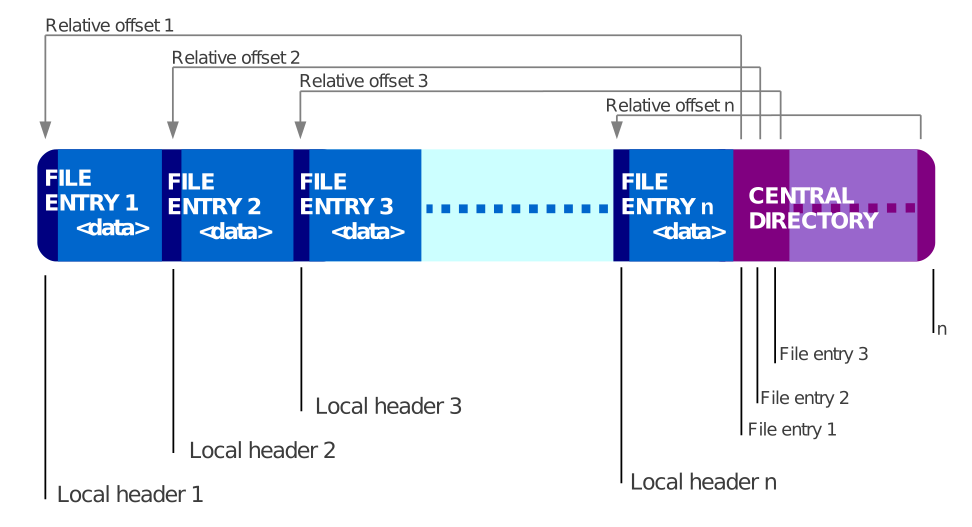
I didn’t really know anything about the ZIP file format beforehand, so this might be trivial if you are already familiar, but as it turns out, ZIP files contain information about their contents in a data block at the end of the file called the Central Directory.

This means that it’s only this part of the archive that’s required in order to list out the content.

On-disk layout of a binary file format that is both the ZIP container and its relevance in the 64-bit format.
https://commons.wikimedia.org/wiki/File:ZIP-64_Internal_Layout.svg

HTTP range requests are specified by setting a header that has the form: Range: bytes=<from>-<to>, so that means if we can somehow get a hold of the byte offset of the Central Directory and how many bytes it takes up in size, we can issue a range request that should only carry the Central Directory in the response.

The offsets we need are both part of the End of central directory record (EOCD), another data block, which appears after the Central Directory, as the very last part of the ZIP archive. It has variable length, due to the option of including a comment as the last field of the record. If there’s no comment it should only be 22 bytes.

Back to square one. We have to solve the same problem to get just the EOCD, as we have for the Central Directory. Since the EOCD is at the very end of the archive, to corresponds to the Content-Length of the file. We can get that simply by issuing a HEAD request:

$ curl --head https://rhardih.io/wp-content/uploads/2021/04/test.zip
HTTP/2 200
date: Sun, 18 Apr 2021 14:45:22 GMT
content-type: application/zip
content-length: 51987
set-cookie: __cfduid=dd56ae29f49cf9931ac1d5977926f61c01618757122; expires=Tue, 18-May-21 14:45:22 GMT; path=/; domain=.rhardih.io; HttpOnly; SameSite=Lax
last-modified: Sun, 18 Apr 2021 13:12:45 GMT
etag: "cb13-5c03ef80ea76d"
accept-ranges: bytes
strict-transport-security: max-age=31536000
cf-cache-status: DYNAMIC
cf-request-id: 09870a92ce000010c1d6269000000001
expect-ct: max-age=604800, report-uri="https://report-uri.cloudflare.com/cdn-cgi/beacon/expect-ct"
report-to: {"group":"cf-nel","endpoints":[{"url":"https:\/\/a.nel.cloudflare.com\/report?s=Ko46rGYqFfKG0A2iY93XNqjK7PSIca9m9AK5iX9bfUUYr0%2BzdzjMN1IJXQ%2Fn5zjj%2B96d2%2Bnaommr%2FOUaGrzKpqyUjaeme0HGvA1z"}],"max_age":604800}
nel: {"report_to":"cf-nel","max_age":604800}
server: cloudflare
cf-ray: 641ead314d8710c1-CPH
alt-svc: h3-27=":443"; ma=86400, h3-28=":443"; ma=86400, h3-29=":443"; ma=86400

In the case of the test file; 51987 bytes. So far so good, but here’s where we have to cut some corners. Due to the comment part of the EOCD being variable length, we cannot know the proper from offset, so we’ll have to make a guess here, e.g. 100 bytes:

$ curl -s -O -H "Range: bytes=51887-51987" https://rhardih.io/wp-content/uploads/2021/04/test.zip
[~/Code/stand/by] (master)
$ hexdump test.zip
0000000 7c 60 dd 2f 7c 60 50 4b 01 02 15 03 14 00 08 00
0000010 08 00 5b 79 92 52 58 64 08 f4 05 28 00 00 00 28
0000020 00 00 0e 00 0c 00 00 00 00 00 00 00 00 40 a4 81
0000030 44 a1 00 00 72 61 6e 64 6f 6d 2d 62 79 74 65 73
0000040 2e 31 55 58 08 00 ba 2f 7c 60 dd 2f 7c 60 50 4b
0000050 05 06 00 00 00 00 05 00 05 00 68 01 00 00 95 c9
0000060 00 00 00 00
0000064

Since we’ve most likely have preceding bytes that we don’t care about, we need to scan the response until we find the EOCD signature, 0x06054b50, (in network byte order). From there extracting the offset and size for the Central Directory is straightforward. In the case above we find it at 0x0000c995, with a size of 0x00000168 (or 51605 and 360 base 10 respectively).

One more curl command to get the Central Directory:

$ curl -s -O -H "Range: bytes=51605-51987" https://rhardih.io/wp-content/uploads/2021/04/test.zip

Notice I’m including the EOCD here, but that’s just so we can use zipinfo on the file. Really to would be 51965.

Here’s a zipinfo of the original file:

$ zipinfo test.zip
Archive:  test.zip
Zip file size: 51987 bytes, number of entries: 5
-rw-r--r--  2.1 unx    10240 bX defN 21-Apr-18 15:10 random-bytes.3
-rw-r--r--  2.1 unx    10240 bX defN 21-Apr-18 15:10 random-bytes.4
-rw-r--r--  2.1 unx    10240 bX defN 21-Apr-18 15:10 random-bytes.5
-rw-r--r--  2.1 unx    10240 bX defN 21-Apr-18 15:10 random-bytes.2
-rw-r--r--  2.1 unx    10240 bX defN 21-Apr-18 15:10 random-bytes.1
5 files, 51200 bytes uncompressed, 51225 bytes compressed:  0.0%

And here it is of the stripped one:

$ zipinfo test.zip
Archive:  test.zip
Zip file size: 382 bytes, number of entries: 5
error [test.zip]:  missing 51605 bytes in zipfile
  (attempting to process anyway)
-rw-r--r--  2.1 unx    10240 bX defN 21-Apr-18 15:10 random-bytes.3
-rw-r--r--  2.1 unx    10240 bX defN 21-Apr-18 15:10 random-bytes.4
-rw-r--r--  2.1 unx    10240 bX defN 21-Apr-18 15:10 random-bytes.5
-rw-r--r--  2.1 unx    10240 bX defN 21-Apr-18 15:10 random-bytes.2
-rw-r--r--  2.1 unx    10240 bX defN 21-Apr-18 15:10 random-bytes.1
5 files, 51200 bytes uncompressed, 51225 bytes compressed:  0.0%

Ruby implementation

A bunch of curl commands is all well and good, but in my case I actually needed it as part of another script, which was written in Ruby.

Here’s a utility function, which basically does the same thing as above, and returns a list of filenames:

EOF

Obviously this whole dance might be a bit of an over-complication for smaller zip files, where you might as well just download the whole thing, and use normal tools to list out the content, but for very large archives maybe there’s something to this trick after all.

If you know of a better or easier way to accomplish this task, feel free to leave a comment or ping me on Twitter.

Over and out.

Addendum

After posting this, it’s been pointed out to me, that the initial HEAD request is redundant, since the Range header actually supports indexing relative to EOF.

I had a hunch this should be supported, but as it wasn’t part of one of the examples on the MDN page, I overlooked it.

In section 2.1 Byte Ranges of the RFC, the format is clearly specified:

   A client can request the last N bytes of the selected representation
   using a suffix-byte-range-spec.

     suffix-byte-range-spec = "-" suffix-length
     suffix-length = 1*DIGIT

This means we can start right from the initial GET request and just specify a range for the last 100 bytes:

$ curl -s -O -H "Range: bytes=-100" https://rhardih.io/wp-content/uploads/2021/04/test.zip

Here’s the updated Ruby script to match:

Migrating from LastPass to pass

I’ve been using LastPass as a password manager since 2012 and even paid for the Premium subscription, so I could access it from my phone. That specific feature later turned free, and has recently turned paid again. It’s not that I’m unhappy with LastPass per se, or that I wouldn’t want to pay for the service again. I’ve just had my eye on an alternative with a bit more control in the past, e.g. self-hosted Bitwarden. I never did get around to doing it however. It just seemed like a little too much effort for little gain.

That being said, ever since a colleague introduced me to The standard unix password manager, pass, I’ve started to use it alongside LastPass and think it’s a brilliant tool. For that reason, I’ve been wanting to do a setup based on it, to replace LastPass entirely.

Overall pass mostly offers the same core feature as LastPass, in the sense that it provides a means to store a collection passwords or notes in an encrypted manner. LastPass has a few more bells and whistles though. To name a few I’ve found useful:

  • Automatic synchronisation between devices.
  • Access from mobile.
  • Autofill in the browser.

Export / Import

Luckily getting passwords out of LastPass is very easy. The extension provides a direct file download from Account Options > Advanced > Export > LastPass CSV File.

The question is then, how to move the content of this file into pass~/.password-store.

There’s no support for importing random CSV files in pass itself, so my first thought was to write a small script, that would go through the file line by line and issue the corresponding pass insert commands for each entry.

Before doing that, luckily I came to my senses and looked for existing solutions first.

On the homepage of pass there’s a link to an extension for this very problem; pass-import and it supports importing from a LastPass vault. It’s not written by the author of pass though, so the question is whether it can be trusted?

Deciding to feed the entirety of your passwords portfolio to some tool you’ve found online shouldn’t be done lightly, but given the fact that it is linked from the official homepage and appears to have some activity and approval on GitHub, does make it seem trustworthy.

I did look a bit through its source as it appears on GitHub, but didn’t really know what specifically to look for. Also I didn’t find anything that smelled outright like, “send this file over the internet”. For that reason, and the above, I decided to throw caution to the wind and give it a go.

Installing the extension

My install of pass comes from Homebrew, but unfortunately only the pass-otp and pass-git-helper extensions seems to be available as formulae:

$ brew search pass
==> Formulae
gopass              lastpass-cli        pass-otp ✔          passwdqc
gopass-jsonapi      pass ✔              passenger           wifi-password
keepassc            pass-git-helper     passpie

Bummer… It is available from pip though:

pip3 install pass-import

This way of installing it doesn’t integrate with pass in the normal way however:

$ pass import
Error: import is not in the password store.

Not to worry, it is possible to invoke the extension directly instead:

$ pimport pass lastpass_export.csv --out ~/.password-store
 (*) Importing passwords from lastpass to pass
  .  Passwords imported from: /Users/rene/lastpass_export.csv
  .  Passwords exported to: /Users/rene/.password-store
  .  Number of password imported: 392

Marvellous! All of my LastPass vault is now in the pass store.

Missing features

Most important of all is probably synchronising the store between different machines, so let’s take a look at that first.

LastPass synchronises its vault via its own servers. With pass you could achieve something similar, by putting your store on Dropbox or Google drive for instance, but there’s another alternative I think is even better. There’s an option in pass to manage your store as a Git repository and as such, it would allow pushing and pulling from a central Git server.

Now the point of this whole exercise, is to have a solution that provides a lot more control and even though everything in the pass store is encrypted, pushing everything to e.g. GitHub, defeats the purpose somewhat.

Gitea

I’ve opted to self-host an instance of Gitea and use it to host the Git repository for my pass store. UI wise It’s a lightweight clone of GitHub, so it appears very familiar. I won’t get into the specifics of how to set it up here, but the official docs are quite good on that front anyway; Installation with Docker.

The man page for pass, has a very good example of migrating the store to use git in the “EXTENDED GIT EXAMPLE” section.

Whether you choose to self host or use another service for Git, after you’ve initialised the repository through pass and done an initial push, everything should show up in your remote. Encrypted of course.

Cloning the repository on a new machine and copying over your GPG key is basically all that is really needed. Here’s an example moving a GPG key from one machine to another:

hostA $ gpg --list-keys # Find the key-id you need
hostA $ gpg --export-secret-keys key-id > secret.gpg

# Copy secret.gpg to hostB

hostB $ gpg --import secret.gpg

You might need to trust the key on the new machine, but now synchronising additions and removals from the store, is just a git push/pull away.

What about mobile?

I’m an Android user, so for me it turns out this is an easy addition. You only need two apps:

Password Store handles the git interactions and browsing of the password store, whilst OpenKeychain allows you to import your GPG key to your phone.

That part was definitely easier than expected, but obviously this is assuming your phone can reach your git server. I put my Gitea installation on a publicly resolvable hostname, so this was not a problem in my case. Using a VPN client on the phone might also be an option, if you don’t want anything public facing.

The Password Store app doesn’t seem to do autofill, but to be honest, the way overlays work in Android is kind of annoying anyway. I don’t suspect I’ll miss it. A bit of copy pasting is fine by me.

Edit 21/03/21: The Password Store app does support autofill! I just didn’t see it in the input field drop-downs alongside LastPass when I did my initial testing as it is not enabled by default. My apologies for the misinformation.

There’s a radio toggle in Settings > Enable Autofill and enabling it will add Password Store as a system wide Auto-fill service:

Password Store in the Auto-fill service settings

It works similarly to the way LastPass worked, where you can invoke it from an empty input or password field in other apps.

Wrap up

As of today LastPass is gone from my phone, but I’ll keep the browser extension on the desktop around for a little while. Just as a backup.

On the subject of browser extension, there is the browserpass-extension. It requires a background service to interface with pass, which is to be expected, but also a little messy, so for now I’ll see if I can get by without it.

Links

Spelunking Advent of Code, Some Assembly Required – part 3 of 4 – The Observer Pattern

This post is the third in a series, exploring a random assortment of techniques, data-structures etc. Each of which can be used to solve a puzzle from the 2015 edition of Advent Of Code, namely the first part of Day 7: Some Assembly Required.

See Part 1 for details on Advent of Code in general, as well as a summary introduction to the puzzle itself.

In this post we’ll take a look at how the observer pattern can be used to solve the dependencies between instructions.

Observer

This pattern is used in object oriented programming and it can solve a one-to-many dependency between objects without making them tightly coupled.

The term was originally coined in the “Gang of Four” book where the intent of the pattern states:

“Define a one-to-many dependency between objects so that when one object changes state, all its dependents are notified and updated automatically.”

Excerpt From: Gamma, Erich. “Design Patterns: Elements of Reusable Object-Oriented Software”. Apple Books.

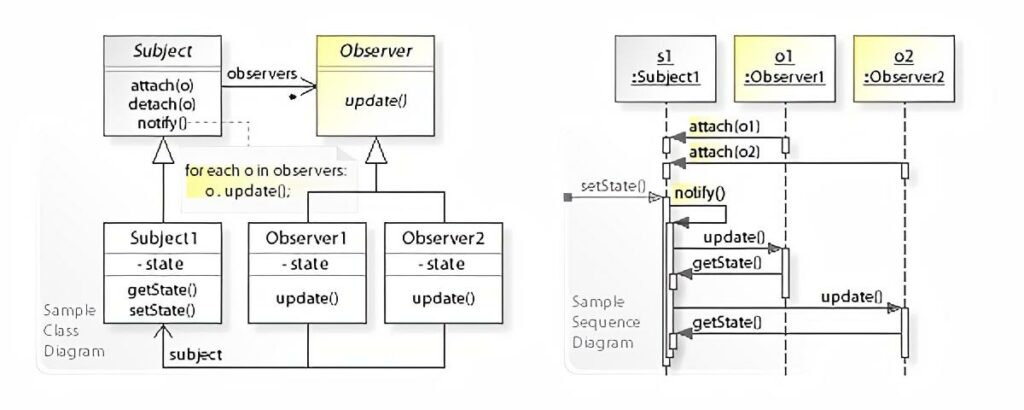
If we take a look at the class and sequence diagrams from the Wikipedia article it makes a bit more sense how something like this could be implemented in an object oriented fashion.

Illustration of the observer pattern as a UML class and sequence diagram.
By Vanderjoe – Own work, CC BY-SA 4.0, https://commons.wikimedia.org/w/index.php?curid=61809260

The Subject keeps an internal collection of all of its observers and when its state changes, it notifies each of them by calling their update method. Each Observer can then in turn get whatever state they might depend on by calling a getter on the Subject. In this example Subject has a getState method.

The beauty of this is that the Subject can be agnostic about its observers, as long as they provide an update method.

Instructions and objects

The question is then, how do we model our puzzle in an object oriented manner, so we can apply this pattern?

In part 2 we looked into how we could define dependencies between wires on the left- and righthand sides in the instructions. In the simplest application of this idea, we could define two objects, A and B where A would represent the lefthand, or the expression if you will and B would represent the wire output on the right.

B would observe A, and B itself would possibly be observed by a separate instance of A and so on and so forth until all connections are joined up.

Even though both of these objects exhibit identical behaviour, according to the original definition of Subject and Observer, they must behave differently in the way they each handle their state.

An instance of A would need complex logic in order to act as all the different forms of expressions encountered.

Signals, wires and gates

Perhaps it would be better to avoid the complex logic and go the way of Smalltalk by making everything an object.

Let’s imagine that we split instructions down into their basest components, namely the Signal, the Wire and the Gate. That would allow us to define the same observability relationships amongst the individual components of an expression as we could between an expression and an output from the model above.

If we use the sample input as a basis:

123 -> x
456 -> y
x AND y -> d
x OR y -> e
x LSHIFT 2 -> f
y RSHIFT 2 -> g
NOT x -> h
NOT y -> i

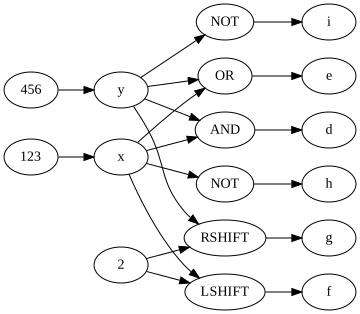
And then draw the relationships in this split-up manner, we get the following graph:

Using the sample input as an example, illustration of observability where everything is split out into own objects.
Sample instructions as an observer graph

For resemblance to the original instructions the arrows are pointing opposite of the worded meaning of observe. I.e. y has an incoming arrow from 456, meaning y observes 456.

Solution

Despite alluding to Smalltalk above, and the fact that all objects in Smalltalk provides this pattern out of-the-box, I’ve chosen another language which I have about the same amount of real-world experience with. That is to say, little to none.

That language is Java and the reason is, both because it has a built-in implementation in the form of:

But also because Java was the first place I came across this pattern, all the way back when I was a student.

Note: Apparently both of these were deprecated already back in 2016, but in the context of this solution, I don’t think we need to worry about the stated pitfalls.

It is very verbose, but hey that’s Java for you. Here’s the source:

There might be a better way, but here’s how it can be run from the commandline:

$ javac 7p1-observer.java && java SomeAssemblyRequired < 7.in

Link to my input.

Note: There’s no bounding of 16 bit values in this solution. It’s not because int in Java is 16 bits. In fact it’s a 32-bit signed two’s complement integer. The reason is rather that I noticed the output was correct despite just using int. Perhaps it wasn’t even needed to begin with, or perhaps I was just lucky to have an input that never generated any integer overflows.

In any case, let’s take a look at the code. Starting out there’s the SignalProvider interface, which defines access to the main piece of state for all of our objects. Each of the base classes SignalInput, Wire and Gate implement this interface, in order to provide a uniform way for an observer to get the value of a signal update.

Next up is the SignalInput class, which is quite simple, because it doesn’t need to implement Observer. A signal doesn’t depend on any inputs.

There isn’t all that much to the Wire class either. It has an id aside from its signal and needs to be able to both be observed as well as observe others. When its update method triggers, it will get the value of the signal from the observed signal provider store it and then notify its own observers as well.

Unsurprisingly the Gate and its derived classes are where the logic of the program lives. Gate is an abstract class, because we need to differentiate the different logical operations a gate can perform. Like Wire it must extend Observable and implement Observer, because it has both input and output.

The only thing to really note about the concrete gate classes is how they differ depending on whether there’s a single or multiple inputs.

Take the AndGate for instance. Since it cannot produce an output before it has a signal on both incoming wires, (or inputs), it has to store the first incoming signal value and only on receiving the second, can it update its own signal value and notify its observers.

The unary gates for NOT, RSHIFT and LSHIFT doesn’t need to do this because, they have everything they need from the get-go.

The next section defines all the different Instruction classes. Each Instruction class has the ability to perform a modification on an instance of Circuit. The modification corresponds to the input instruction the class represents. This really boils down to connecting inputs and outputs via addObserver, and possibly putting gates in between.

There’s one of the Instruction classes, SignalImmediateInstruction, that sticks out from the rest because it has the addition of a trigger method. The reason for having this, is as a means to defer the running of the circuit until it’s been fully assembled.

You can imagine setting signal values immediately after an instruction has been performed on a circuit having little effect, simply because all observers might not have been attached at the time the instruction is encountered in the input. Having trigger allows to postpone this until all instructions have been carried out.

The InstructionFactory is really just a place to put the heavy handed input handling which matches input instructions by regular expressions. Not quite the nimble read of Ruby unfortunately.

The Circuit class is a wrapper around the associate array we’ve been using previously, with the added convenience that it dynamically generates new Wire instances, if one is requested via getWire that wasn’t already present. This is makes the logic of Instruction classes easier, as they don’t need to manage creation of wires. They just retrieve and connect them.

Finally our main entrypoint is the SomeAssemblyRequired class. It mimics the input handling from the previous solutions by reading lines from stdin, passing them on to the InstructionFactory and performing the returned instructions on a Circuit instance.

Once all instructions are done, it goes through each SignalImmediateInstruction and runs the aforementioned trigger method. This starts the chain-reaction of observables notifying observers of changes and so on and so forth.

After this all wires should have their correct signal values, so we just fetch the one for “a” and print out the result.

Run-time analysis

If we think about all the connections between the objects that represent the circuit as a graph, in the same manner as we did previously for the sample input, we can then reason that the circuit must be a directed acyclic graph, or DAG.

It’s directed because each object has one or more inputs and one output, dictating a direction for the signal to travel. It must be acyclic as well, since if it wasn’t, a signal in the circuit would just wind up travelling around in a wire loop forever and we couldn’t construct a program that simulates it.

We know that each connection in such a graph would represent a callback from an Observer to and Observable, so if we can figure out how many connections there is in the graph, we can derive the run-time complexity based on that.

If we have a DAG of n nodes, then pick any node from the graph, let’s call it n0. The maximum number of nodes it can be connected to, without creating a cycle, is n - 1. That is, all but itself.

Let’s assume n0 has that many connections. Then let’s pick another node, n1, this node can have a maximum of n - 2 connections, since it cannot connect to itself nor n0.

Thus the maximum number of connections in a circuit is the the familiar arithmetic progression: n + (n - 1) + (n - 2) + .... + 2 + 1 = n * (n + 1) / 2.

It would appear we still haven’t escaped that O(n^2) complexity.

Now it goes to reason, that our particular circuit isn’t as strongly connected as that and the amount of connections is much closer to some constant times n, which would probably yield a run-time closer to linear, but for the worst case, this is probably what should be expected.

Memory Usage

These numbers are based on (Runtime.totalMemory - Runtime.freeMemory) / 1024L for a KiB measure. Again, I’m not really all that familiar with Java, so if there’s a more accurate way to do it, feel free to leave a comment.

I ran the garbage collector before and after the main application logic and then stored the memory values as indicated above:

$ javac 7p1-observer.java && java SomeAssemblyRequired < 7.in
Signal ultimately provided to wire a: 16076
Memory before initial GC: 2621KiB
Memory after initial GC / before run: 276KiB (diff: -2344KiB)
Memory after run: 8141KiB (diff: 7864KiB)
Memory after final GC: 581KiB (diff: -7559KiB)

I have no idea why so much memory is allocated before the program runs, but the increase of ~7.8MiB is probably valid. I would expect this to be fairly memory hungry after all, due to the very large number of objects being created, each invoking callbacks for each signal propagation.


In the next post we’ll take a look at a solution using Go channels to simulate the wire connections in a concurrent way.

Spelunking Advent of Code, Some Assembly Required – part 2 of 4 – Sorting

This post is the second in a series, exploring a random assortment of techniques, data-structures etc. Each of which can be used to solve a puzzle from the 2015 edition of Advent Of Code, namely the first part of Day 7: Some Assembly Required.

See Part 1 for details on Advent of Code in general, as well as a summary introduction to the puzzle itself.

In this post we’ll take a look at how we can use sorting to solve the issue of instructions having arbitrary ordering in the input. We’ll be using Ruby again so we can do some run-time comparisons with the Queue based solution from Part 1.

Sorting

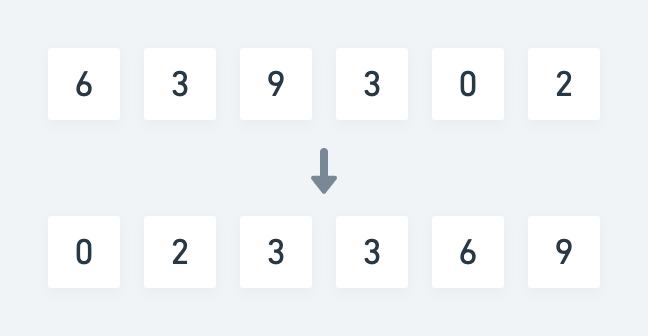
In computer science sorting usually means ordering elements of a list or an array in a lexicographical or numerical manner. E.g. for a random list of numbers, a sorted version could look like so:

Unsorted to sorted

Each element compared to the next follows the relation a ≤ b. For numbers this relation is trivial because it has a strict mathematical definition. For words and letters it’s much the same, as each can be boiled down to a numeric representation as well.

In our case however each instruction isn’t necessarily directly comparable. Let’s take two random instructions from my input as an example:

fs AND fu -> fv
bz AND cb -> cc

If we just look at these two instructions, there isn’t any meaningful way that we can say that one should be ordered before the other. The relation between the two is simply lacking context.

Looking at each instruction individually however, we can reason about the relation between individual wires instead.

If we formulate the relation as depends on, for the above two instructions, we can say that fv depends on fs and fu, and that cc depends on bz and cb.

This should be enough to create an ordering definition that makes it possible to sort all instructions in a way where they can be carried out from top to bottom.

An instruction A with a lefthand side reference to a wire X depends on an instruction B with a righthand reference to a wire X.

As an example, the instruction ff AND fh -> fi depends on the instruction et OR fe -> ff. This means we must place the former after the latter in the the list of instructions.

Solution

The idea of this solution is that by re-ordering the instructions according to the above definition beforehand, we can then carry them out one by one, as is, and any wire will always have a signal by the time we reach an instruction that references it.

As in Part 1, we keep track of the overall state of the circuit in an associative array, which maps the name of a wire to its current signal value. Additionally in this version, we keep a list of wires which have resolved dependencies, which will form the decision basis for the ordering of sorted instructions.

The solution has three separate parts. Seeding, extraction and execution. Here’s the pseudo algorithm:

Outline

  1. Find the instructions that has no dependencies and use them to seed the sorted collection.
  2. While there’s still instructions left:
    1. Find the ones with resolved dependencies, extract and append them to the sorted collection.
  3. Execute the sorted instructions from top to bottom and store wire signals along the way.
  4. Print out the value of desired target wire.

Here’s the Ruby source:

Note: We have to do the same kind of bounding as in Part 1, in order to maintain 16-bit values throughout .

On lines 17-21 we do the initial seeding. Ruby has a .partition method which divides an enumerable into two new arrays based on the value of a predicate for each element.

We use this to separate all the instructions which we know have no dependencies, from the ones that have. Namely the instructions that directly assigns a signal to a wire. For each matching instruction we append the name of the output wire to the list of resolved wires, so we can use it for lookup later.

Lines 23-54 is really the meat of the program, and consists of an outer loop and an inner loop in the form of another .partition. The idea is pretty much the same as with the initial seeding, except this time we keep going until we’ve moved all remaining instructions into the sorted collection.

On each iteration of the outer loop, we pluck some subset of instructions which all have resolved wire dependencies and move them to sorted ones. At the same time we mark the output wires of those instructions as resolved as well.

Finally on lines 56-75 we carry out each sorted instruction and update the wire signals on the circuit as we go.

Input is again read from stdin, so the program can be run like so:

$ ruby 7p1-sort.rb < 7.in

Run-time analysis

As with the Queue solution, I’m going to disregard regex matches and hash lookups, since they mostly likely are not the dominating factor.

Let’s look at each separate part of the program. Seeding and execution each runs through the list of instructions once yielding a O(n) + O(n) = O(n) run-time.

The most work is obviously done in the extraction part where we have a nested loop.

The outer loop is not bounded strictly by n, since we’ve already extracted some amount m of seed instructions. At the same time we extract some amount o of instructions each iteration, so the outer loop will never run n - m iterations because o > 0. Inversely the inner loop will pluck more and more instructions, due to more resolved wires. This makes o grow monotonically with each iteration of the outer loop.

However, since we cannot know for certain exactly how many instructions are extracted on each pass, we have to fall back on knowing that at least one instruction will be. This is yields the same familiar progression as in Part 1:

n + (n - 1) + … + 2 + 1

Good old O(n^2). That means we can throw out the lesser O(n) run-times of the seeding and the execution part.

We’re not quite done yet though. Inside that inner loop hides another lookup. Every time we test if a wire has been resolved, we do so by using .include. Which is most likely an O(n) linear search operation.

That means the final run-time complexity is O(n^3).

I’m sure there’s some tricks to make this approach more viable, but I’ll leave that up to the astute reader.

Still the output is small enough that the programs runs fast:

$ time ruby 7p1-sort.rb < 7.in
Signal ultimately provided to wire a: 16076

real    0m0.329s
user    0m0.260s
sys     0m0.051s

If we consider the running time of the Queue based approach, 0m0.225s, this is almost 50% slower by comparison however.

Memory usage

We’ll re-use the profiling approach from Part 1 and from that we can see the following allocations:

$ ruby 7p1-sort.rb < 7.in | head -3
Signal ultimately provided to wire a: 16076
Total allocated: 15.38 MB (248603 objects)
Total retained:  60.86 kB (1022 objects)

Again the sorting based approach takes a hit. It allocates about 4.3x the number of objects and uses about 3.3x the amount of memory compared to using a Queue.

Looking at which classes take up the most amount of memory this time around we get:

allocated memory by class
-----------------------------------
   7.10 MB  String
   5.89 MB  MatchData
   2.38 MB  Array
  14.43 kB  Hash
   72.00 B  Thread::Mutex

It’s not entirely surprising to see MatchData high up the list again, since we’re now doing the Regexp#=== pattern for the case statements in two different places.

I was a bit surprised at exactly how much String data was being allocated, so taking a look at another section of the MemoryProfiler output reveals that the most memory is allocated at the following lines:

allocated memory by location
-----------------------------------
   5.58 MB  7p1-sort.rb:31 (:27)
   2.07 MB  7p1-sort.rb:37 (:33)
   1.76 MB  7p1-sort.rb:41 (:37)
   1.31 MB  7p1-sort.rb:45 (:41)
   1.03 MB  7p1-sort.rb:47 (:43)

The line numbers are slightly off, compared to the version in the above gist, because that one doesn’t include the lines for MemoryProfiler. The ones in parenthesis correspond to the gist version.

The top offender is where we split an instruction into an expression and an output part on line 27. The other four are all MatchData from the regex matches in the following case block. It does make sense though, since these are all part of the inner loop.

All in all this approach is definitely a step back performance wise, compared to the Queue based solution.


In the next post we’ll take a look at a solution based on the observer pattern, which entirely sidesteps the issue of arbitrary instruction ordering, by managing dependencies as observers. Part 3.