Dead simple concurrency limitation in Go

Backgrounding long running tasks is a classic and ubiquitous problem for web applications.

E.g. Something triggered the need to download and manipulate a file, but we don’t want to hold up the main thread responsible for bringing a response back to the client.

Most likely you’d want to offload this task to a background worker or another service, but sometimes it’s nice to be able to just handle the processing right then and there.

Go makes concurrency incredibly simple with the go keyword. So simple in fact, that you might quickly run into problems if you are handling files in this manner and just spin up new goroutines for everything.

File descriptors

Herein lies the problem. Most systems don’t have an unlimited number of file descriptors for a process to use. Probing the two machines within my current reach yields the following:

$ sw_vers
ProductName:    Mac OS X
ProductVersion: 10.11.4
BuildVersion:   15E65
$ ulimit -n
256
~$ cat /etc/issue
Ubuntu 14.04.4 LTS \n \l
 
~$ ulimit -n
1024

Evidently there isn’t all that many available on either system. Opening a ton of sockets and files at once, will inevitably lead to errors; “Too many open files” or similar.

Limitation

Go’s concurrency primitives lends itself to definitions laid out by Tony Hoare in Communicating sequential processes and as such Go has the concept of channels.

Channels provides the necessary “blocking” mechanism, to allow a collection of goroutines to handle a common workload. Instead of creating a lot of goroutines all at once, rather a handful can be created, each waiting to handle incoming items on a channel.

Below is a very simple example, where a, (buffered channel with five slots*), channel is created as a work queue. Subsequently five goroutines are created and each set to wait on incoming work from the queue. In the main thread, the queue is then filled up all at once with work for the goroutines.

Once all the work have been loaded onto the queue, the channel is closed, which is Go’s way of telling consuming goroutines that nothing more will appear on the channel. This works in tandem with the range keyword to keep receiving on the channel until it is closed.

Note, the WaitGroup is effectively a Monitor; another concurrency construct that allows the main thread to wait for all the goroutines to finish.

Running the program produces the following output:

$ go run conc.go
10:25:37 Work a enqueued
10:25:37 Work b enqueued
10:25:37 Work c enqueued
10:25:37 Work d enqueued
10:25:37 Work e enqueued
10:25:37 Work f enqueued
10:25:39 Worker 1 working on a
10:25:39 Worker 3 working on d
10:25:39 Work g enqueued
10:25:39 Work h enqueued
10:25:39 Worker 2 working on b
10:25:39 Work i enqueued
10:25:39 Worker 4 working on e
10:25:39 Work j enqueued
10:25:39 Worker 0 working on c
10:25:39 Work k enqueued
10:25:41 Worker 0 working on j
10:25:41 Worker 3 working on g
10:25:41 Worker 2 working on h
10:25:41 Worker 1 working on f
10:25:41 Worker 4 working on i
10:25:41 Work l enqueued
10:25:41 Work m enqueued
10:25:41 Work n enqueued
10:25:41 Work o enqueued
10:25:43 Worker 0 working on k
10:25:43 Worker 1 working on n
10:25:43 Worker 3 working on l
10:25:43 Worker 2 working on m
10:25:43 Worker 4 working on o

Go’s concurrency primitives is that rare combination of easy and powerful, making it effortless to write threaded code.

It doesn’t save you from inherent limitations of the host system however, which is a good thing. Awareness of what the code actually does on the machine, is a virtue to strive for.

Edit: Thanks to Jemma for pointing out that buffering the channel isn’t needed afterall.

This post was included in the Go Newsletter issue 110.

Moving to a new domain – rhardih.io

This blog has been at my own “dump-all” domain éncoder.dk for ages, so it’s about time to move it to it’s own toplevel domain. As it were, the handle I use in most places, rhardih, is obscure enough to be available pretty much everywhere and as luck would have it, that goes for domain names as well. Hence, I’ve gone ahead and moved everything over to rhardih.io.

If I managed to do the move correctly, all permalinks should still work just fine, albeit with a 301 redirect in front. If not let the confusion begin!


WyGzoEr

lazy-images-rails or: How I Learned to Stop Worrying and just wrote a Rails plugin

I worry

One thing that really bugs me, which apparently seems a ubiquitous trend on the web today, is the ever increasing size and sluggishness of many web pages. Why optimise for speed and effectiveness when you can plaster your users with megabytes of Javascript and a plethora of huge images? Surely we as developers shouldn’t bother ourselves with concerns of such trivial nature. Network technology will save us, right?

No.

You can strap a rocket to a turd, but that doesn’t make it a spaceship.

One part of it is surely monstrous asset packages, but another just as important part is images. Does this look familiar?

KyTy8LV

Succinctly, reddit user ReadyAurora5 puts it beautifully:

The fury this incites in me is unhealthy. I want to find whoever was responsible for this, tie him/her up and give them a touchscreen that says: Should you be let go? YES or NO… with absolute assurance that which ever they click on will be fulfilled. I’m leaving it completely up to them. Of course they’ll click yes, but when they go to, IT FUCKING MOVES TO ‘NO’ HAHAHAHA. NOW DO YOU SEE!? REAL FUCKIN’ FUNNY ISN’T IT!?

Sorry…I lost myself there.

So what to do?

I worry no more

On a personal project I decided to deal with the image part of the problem. The solution I decided to go with, was to simply have inline SVG placeholders, with the exact dimensions of the target image. Inlining the placeholders directly in the markup adds the benefit of instantly taking up the required space on a page instead of having to wait for another round-trip to fetch the image from the server.

I’m aware that the same effect can be achieved by explicitly setting the width and height attributes of the img tag. The downside of that however, is that it will leave a blank space on the page until the image has been loaded. Aside from this, even if you know the desired size of the image, you might want it to scale with the width of it’s parent container. For square images, the ratio is all the same, so you shouldn’t have to specify a height. This also makes the solution easier in this case. Simply insert an element that renders and scales the same way as the image and replace once it’s ready.

I’m almost certainly not the first to do it this way, but I couldn’t immediately find a ready made drop-in solution for Rails.

For another CSS based solution using bottom padding, see Related below.

The plugin

There’s a more thorough explanation in the project readme, but the main idea for the plugin was to have this functionality added, with the least amount of intrusion into the consuming application.

To achieve this, when including the gem, the Rails image_tag helper is aliased so instead of a bare img tag, a wrapped SVG is inserted instead, along with the necessary data for lazy-loading the image in-place.

A smidgen of javascript is then used to trigger the lazy-load on document ready, but basically that’s it.

Give it a look-see and take it for a spin the next time you want to fill your site with a bunch of images.


GitHub

https://github.com/rhardih/lazy-images-rails

RubyGems

https://rubygems.org/gems/lazy_images-rails

Here’s a different solution to the same problem by Corey Martin on aspiringwebdev.com.

Ruby on Rails Gotcha: Asynchronous loading of Javascript in development mode

Everyone knows that you shouldn’t block page rendering by synchronously loading a big chunk of javascript in the head of your page right? Hence you might be tempted to change the default Javascript include tag, from this:

<%= javascript_include_tag 'application' %>

To this:

<%= javascript_include_tag 'application', async: true %>

Which makes perfect sense, when serving all Javascript in one big file, as is the case in production, meaning everything is defined at the same time. What about development though?

Well, in development rails is kind enough to let you work on individual Javascript files, which means it will recompile only as needed, when a single file is changed. To this effect, each file is included separately via their own script tag in the header. E.g:

<script src="/assets/jquery-87424--.js?body=1"></script>
<script src="/assets/jquery_ujs-e27bd--.js?body=1"></script>
<script src="/assets/turbolinks-da8dd--.js?body=1"></script>
<script src="/assets/somepage-b57f2--.js?body=1"></script>
<script src="/assets/application-628b3--.js?body=1"></script>

* Tags intentionally shortened in example.

There is a subtlety here that is quite important. All the scripts are loaded synchronously, one after the other, as specified by the order they appear in the application.js manifest. This means we’re guaranteed that jQuery, etc. is available once we get to our own scripts.

Now consider the the same scripts, but with async=true:

<script src="/assets/jquery-87424--.js?body=1" async="async"></script>
<script src="/assets/jquery_ujs-e27bd--.js?body=1" async="async"></script>
<script src="/assets/turbolinks-da8dd--.js?body=1" async="async"></script>
<script src="/assets/somepage-e23b4--.js?body=1" async="async"></script>
<script src="/assets/application-628b3--.js?body=1" async="async"></script>

Since all scripts in this case is loaded *asynchronously*, all previous guarantees are now lost, and we’ll very likely start seeing errors like this:

Uncaught ReferenceError: $ is not defined

Oops!

The fix is simple though: Don’t load Javascript assets asynchronously in development mode!

Here’s one way of doing it:

<%= javascript_include_tag 'application', async: Rails.env.production? %>

Happy hacking!

Rails 4 how to: User sign up with email confirmation in five minutes, using Devise and Mailcatcher

Sometimes you might find yourself wanting to quickly prototype an application that requires user sign ups. Here’s a quick guide to setting up a new rails application with user signup and email confirmation.

Example project available here: https://github.com/rhardih/rails4-with-user-signup. Each step below will be annotated with a commit linked on Github.

Set up a new rails project

  1. rails new rails4-with-user-signup -d postgresql
  2. cd rails4-with-user-signup
  3. bin/rake db:create
  4. bin/rails s

If you’re on OS X using PostgreSQL, you might see this error intially:

could not connect to server: No such file or directory Is the server running locally and accepting connections on Unix domain socket “/var/pgsql_socket/.s.PGSQL.5432”?

One extra step adjusting the config/database.yml is needed. Just uncomment the host option and you should be good to go. If you go to http://localhost:3000, you should see the familiar “Welcome aboard, You’re riding Ruby on Rails!” message page.

Commits d991a6b8d2f4.

Add Devise for user sign up and authentication

  1. Follow the Getting Started section of the Devise README. Commits be1c60be34ad3625cd.
  2. Then follow the the Devise wiki page for adding :confirmable to Users. Commits eedaab862a3e2733d84ee44b.
  3. Additonally, to make sure you can actually send email in development mode, add the following options to config/environments/development.rb:
    config.action_mailer.default_url_options = { host: ‘localhost’, port: 3000 }
    config.action_mailer.delivery_method = :smtp
    config.action_mailer.smtp_settings = {:address => “localhost”, :port => 1025} 

    Commit: 35e177.

Setup and run Mailcatcher to capture Devise sign up emails

  1. Install: gem install mailcatcher
  2. Run: mailcatcher

Test run

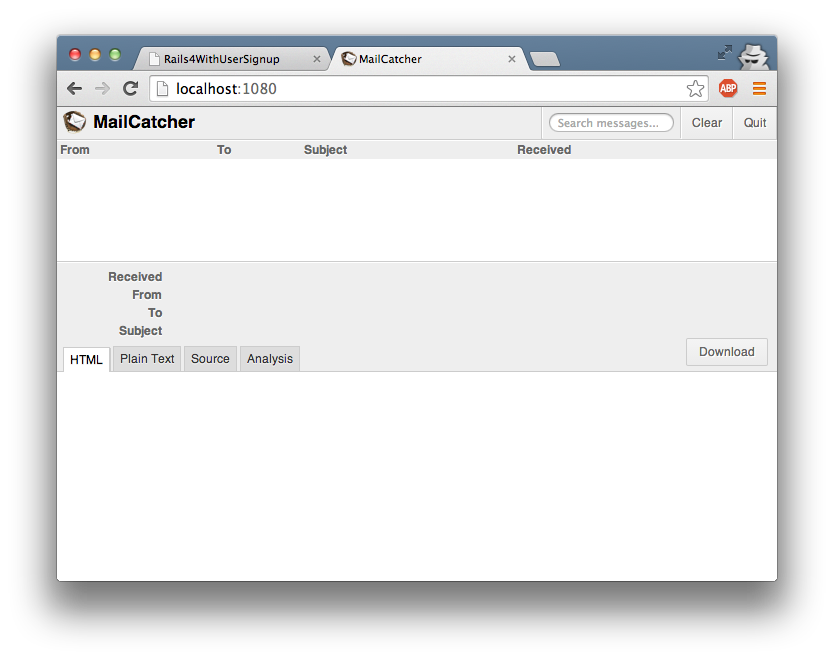
Open another tab at http://localhost:1080, where you can see the mailcatcher interface with an empty mail queue.

Screen Shot 2014-06-03 at 7.57.56 PM

Now go to http://localhost:3000/users/sign_up and create a new user.

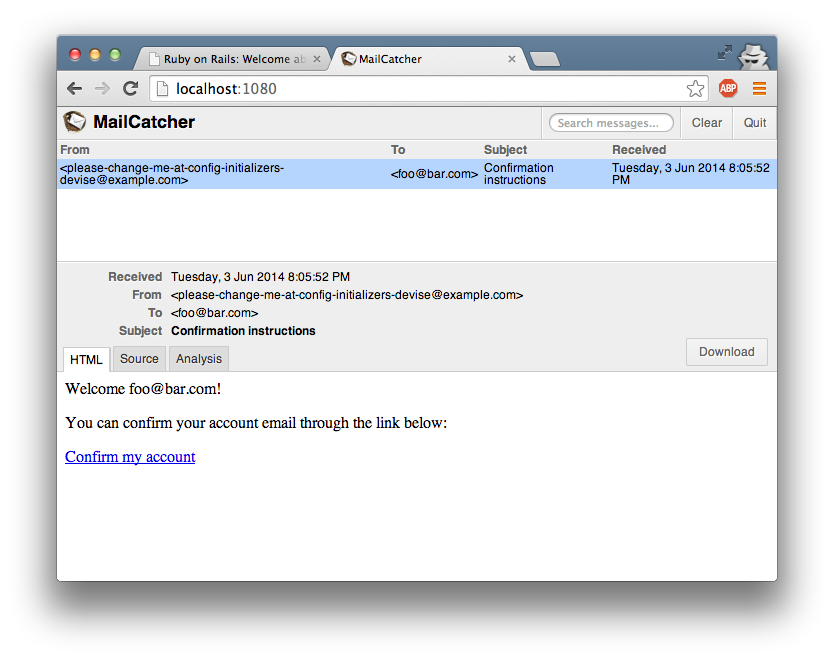
Check again in the mailcatcher interface. You should now see an email with the subject “Confirmation instructions”.

Screen Shot 2014-06-03 at 8.06.06 PM

Congratulations! You’ve just set up a a new rails application with user sign up, authentication and email confirmation.